


Send Message
Privacy statement: Your privacy is very important to Us. Our company promises not to disclose your personal information to any external company with out your explicit permission.

What’s holding your team back is not a lack of talent, but the hidden barriers that stop people from performing at their best—outdated equipment, weak trust, unclear direction, micromanagement, and habits that keep teams from taking ownership. High-performing teams don’t happen by accident; they are built through clear vision, defined roles, open communication, accountability, and the confidence to challenge problems honestly. Chris Power’s “Team Unlocker” approach highlights the importance of first diagnosing where a team stands across key areas such as purpose, culture, collaboration, development, and innovation, so leaders can uncover what is really slowing progress. When individual motivations and comfort zones are not aligned with shared goals, even talented teams can stall. The solution is to connect personal drivers with collective ambition, then give people the space, support, and trust to lead. Upgrade the tools, improve the environment, and your team can unlock stronger performance, better collaboration, and lasting results.


I see this problem a lot.
A team keeps using old gear because it still “works.”
The straps are worn, the fit is off, the battery dies early, the fabric feels rough, the headset cuts in and out.
No one says much. People just keep going.
I have learned that small gear problems can create bigger work problems.
A worker adjusts a bad fit ten times a day.
A driver slows down because the gloves slip.
A field tech misses a call because the headset fails.
A warehouse team wastes energy on gear that should not be part of the job anymore.
I think many managers miss one simple fact: old gear can make good people look less ready than they are.
A few months ago, I spoke with a small delivery team. Their shoes were worn, their rain gear leaked, and their bags were heavy in the wrong places. The team did not ask for much. They wanted gear that fit, held up, and felt easy to use. After they replaced the oldest items, the shift felt smoother. People moved with less strain. I heard fewer complaints about comfort. The work day felt less rough.
That kind of change does not need a big speech.
It starts with a close look at what your team uses every day:
I like to ask my team three plain questions:
If the answer is no more than once, I take that as a sign.
My approach is simple.
I list the gear my team uses most.
I mark the items that cause the most trouble.
I replace the worst pieces first.
I ask for feedback after the change.
I keep notes so the next upgrade is easier.
This works for many teams.
A restaurant crew may need better non-slip shoes and aprons that wash well.
A service team may need stronger bags, clearer labels, and headsets that stay steady during long calls.
A shop floor team may need gloves that fit better and tools that feel easier to hold.
A small office team may need chairs, laptops, or webcams that stop getting in the way of daily work.
I do not look for gear that sounds fancy.
I look for gear that helps people stay focused.
That is the part I value most.
When gear is old, people notice it in small ways first.
They rub their hands.
They shift their shoulders.
They tap a button twice.
They ask for a backup item.
They work around the problem.
When gear fits the job, people can put their attention where it belongs.
I also think replacement plans matter.
A team does better when gear is checked on a regular cycle.
Not because I want to buy things for no reason.
I do it because worn gear often waits until it fails at the wrong moment.
A simple system helps:
That is practical.
It saves guesswork.
It also shows the team that their daily comfort matters.
I have seen teams change fast when they feel heard.
One crew I worked with had old radios that dropped signal in parts of the building. People had started shouting across the floor, which wasted energy and created mistakes. We replaced the worst units and tested the setup by area. The noise dropped. The team stayed calmer. The work felt easier.
That is what better gear can do.
It does not have to be dramatic.
It has to fit the job.
If your team still uses old gear, I would not wait for a clear failure. I would look at the small signs that already show up every day. Slower movement. More fixes. More discomfort. More quiet workarounds.
I trust those signs.
Your team deserves gear that helps, not gear that gets in the way.
A clean upgrade can bring easier work, better focus, and fewer problems that repeat.
I think that is a smart place to invest.

I know the pressure that comes with outdated equipment. A machine slows down, the line backs up, and a simple task starts taking too long. I see it in small shops, busy offices, and work sites all the time. The equipment still runs, yet it drains energy, time, and patience.
I used to think repair work was enough. A new part here, a service call there, and the problem seemed managed. Then I noticed the pattern. The same unit kept stopping. The same delay kept showing up. The same team kept waiting. At that point, the issue was not a single repair. The issue was the machine itself.
When I look at an aging setup, I focus on a few signs:
These signs matter because they point to hidden cost. A machine that looks cheaper on paper can still cost more across a month of lost work, extra labor, and repeated fixes. I have seen this happen with an old copier in a small print shop. It jammed during peak hours, the team reprinted pages, and two client orders ran late. The owner kept the machine because it still worked. The real issue was that it no longer fit the pace of the business.
My approach is simple. I check the full picture before I decide on any equipment upgrade.
I look at how often the equipment stops.
I compare repair cost with replacement cost.
I check whether the current model still matches daily demand.
I ask the team what slows them down most.
I test a new unit on the tasks that matter most.
That last step helps a lot. I do not judge a machine by one smooth demo. I want to see how it handles normal work, pressure, and repeat use. I want to know if it saves effort, cuts waste, and fits the people who use it every day. A good match should make work easier to manage, not harder to learn.
I also pay attention to energy use, service support, and parts access. These points are easy to miss. A machine that uses less power and needs fewer fixes can free up room in the budget. A model with easy parts support can help avoid long gaps when something small goes wrong. These are practical details, and they matter in daily work.
My view is that waiting too long can keep a business stuck. I do not replace equipment because it is old on the calendar. I replace it when it slows the work, adds stress, and keeps the team from doing their best. That shift changes a lot. The day feels smoother. The work feels lighter. The business gets room to move again.
If your equipment keeps dragging the process down, I would start with a clear review and a simple upgrade plan. Look at the delays. Look at the repair record. Look at what your team needs right now. A better fit can make a visible difference, and I have seen that change turn a hard workday into one that feels far more manageable.
I used to think old tools were “good enough.”
They still worked, so I kept using them.
Then the problems piled up.
Tasks took longer than they should.
Small errors showed up more often.
My team had to repeat work we had already finished.
I could feel the gap between effort and result.
That gap is what many people notice too.
When the tool is weak, the work feels heavy.
When the tool fits the job, the whole process gets smoother.
I see this pattern again and again.
A small repair team I worked with kept using a worn drill set.
The batteries ran down fast.
The handles felt awkward.
Workers stopped to fix the tool more than they should have.
After they switched to a lighter cordless set, the job felt easier to manage.
They did not talk about magic.
They talked about less pause, less stress, and fewer delays.
That is the part people often miss.
Better tools do not replace skill.
They give skill a cleaner path.
I look at tool upgrades in a simple way:
This approach saves me from guessing.
It also keeps me from buying something just because it looks new.
I care most about three things.
Ease of use matters, because people work better when the tool feels natural in the hand.
Durability matters, because repeated breakdowns drain focus.
Fit matters, because a tool that matches the task usually gives a cleaner result.
I have learned to ask practical questions before I change anything.
Will this help me finish work with fewer stops?
Will my team learn it without extra confusion?
Will it reduce waste?
Will it make the final result easier to trust?
If the answer is yes to most of those, I pay attention.
I also learned that an upgrade does not need to be large.
A better handle can reduce fatigue.
A more stable connection can cut mistakes.
A clearer interface can help a new team member move faster.
A small change can make a real difference in daily work.
That is why I prefer upgrades that solve a real problem.
I do not chase trends.
I watch for friction.
When the work feels slow, messy, or harder than it should be, I know it is worth checking the tools first.
That habit has saved me many hours and many repeat fixes.
If your work has been feeling blocked, I would start there.
Look at the tool.
Look at the task.
Look at where effort is leaking out.
A better result often begins with a better fit.

I have seen this problem many times.
A team wants to move faster, serve customers better, and keep daily work smooth. Then old equipment gets in the way. A slow laptop freezes during a client call. A worn printer jams when people need a report. A machine needs constant repair. A scanner misses barcodes. Little problems like these stack up, and the whole team feels it.
I do not see old equipment as a small issue. I see it as a daily drain on energy, time, and trust. People start working around the problem instead of working on the real task. That shift changes the mood in the room. It also changes the results.
When I look at a team that feels stuck, I usually ask a simple question: what is the equipment doing to your pace?
A sales team may lose momentum because laptops take too long to load files.
A warehouse team may waste minutes when a label printer fails again.
A design team may wait for software to open on aging devices.
A field team may struggle when tools break before the job is done.
I have watched this happen in small offices and busy operations. The story is the same. People work harder, yet they move slower.
What helps is not a guess. It is a clear check of what is slowing the team down.
I start with the daily pain points.
This kind of review gives me a practical map. I do not try to replace everything at once. I focus on the items that affect work every day.
A simple example makes this easier to see.
A small logistics team I worked with kept losing time at packing stations. The label printer was old, and the scanner missed codes now and then. Staff members kept redoing tasks. They were not careless. The tools were weak. When they replaced those two items, the workflow felt lighter almost right away. People stopped waiting. Orders moved with less pressure. No magic. Just fewer interruptions.
I see the same pattern in offices.
A team member with an old computer may need extra minutes for every file, every search, every call. That does not seem huge in a single moment. Over a week, it becomes a real loss. The person feels behind. The team feels the delay. The workday gets choppy.
I also pay attention to morale.
Old equipment sends a message. It can make people feel that their time does not matter. It can make a team feel overlooked. New or well-kept tools do the opposite. They tell people that the work matters and that their effort is being supported.
Here is how I approach the fix.
I look at the tools that affect core work first.
I compare repair cost with replacement cost.
I check whether a device still fits the job it needs to do.
I ask the team where the friction shows up most.
I replace the worst bottlenecks before smaller items.
That approach keeps the process practical. It also helps control spending. I do not make choices based on appearance. I make them based on use.
One detail matters a lot: old equipment is not always a bad choice.
Sometimes a tool still does its job well. Sometimes a machine is simple, reliable, and already paid for. I keep those items when they still help the team. My goal is not to chase new gear for its own sake. My goal is to remove the things that slow people down.
If I were advising a team today, I would say this:
This gives a team a clear path. It also avoids waste.
I have learned that better equipment does not just support work. It shapes how work feels. People make fewer detours. They stay focused longer. They spend less time fixing preventable issues. That change can be felt in the room.
So when I say, “Don’t let old equipment hold your team back,” I mean it in a practical way. I mean the scanner that slows packing. The laptop that freezes in meetings. The printer that jams before every rush. The tool that keeps asking for repairs. Those are not tiny annoyances. They are signals.
My view is simple.
If a piece of equipment keeps getting in the way, I deal with it before it keeps shaping the team’s day. That choice protects time, supports people, and keeps work moving with less strain.

I used to think productivity came from pushing harder.
My desk told a different story.
A slow laptop made every task feel heavier. A stiff chair left my back sore. A cheap mouse skipped at the worst moments. A messy cable setup kept pulling my eyes away from the screen. I was not lazy. I was dealing with friction all day.
That is why I started looking at my gear with a simple question:
What slows me down, and what can I fix?
I did not replace everything at once. I picked the weak spots that caused the most trouble.
A better chair changed how I sat through long work sessions.
A keyboard with a cleaner feel helped me type with less strain.
A mouse that tracked well made small tasks feel smoother.
A headset with clear sound made calls less tiring.
A brighter desk lamp helped me stay focused when the room felt dull.
I saw a pattern. Small upgrades removed small annoyances. Those annoyances had been adding up.
I remember one week when I had to sort customer notes, reply to messages, and join back-to-back calls. My old mouse kept lagging. I kept repeating clicks. I lost my rhythm. After I switched to a better one, the work did not become easy. It became less messy. That mattered.
A few changes made the biggest difference for me:
I also stopped buying gear that looked good but felt wrong in daily use.
A shiny product can sit on the desk and still waste energy. I care more about how it feels after the third call, the tenth email, the last spreadsheet, the long stretch when my focus starts to slip.
My view is simple.
Gear does not create discipline. Gear supports it.
When my tools work well, I spend less energy fighting the setup. I save my focus for the work itself. That is where productivity can rise.
If you want to upgrade your own setup, start with the part that bothers you most. Maybe it is the chair. Maybe it is the keyboard. Maybe it is the screen glare, the weak sound, or the desk clutter.
I always tell people this:
Do not chase every new gadget.
Fix the thing that makes your work feel harder than it should.
That is the kind of upgrade I trust.
For any inquiries regarding the content of this article, please contact Hu: dgliheng168@163.com/WhatsApp +8613509684273.
References
Miller Sarah 2021 The Hidden Cost of Outdated Equipment
Chen David 2022 Better Tools Better Workflow
Johnson Emily 2020 How Gear Impacts Team Productivity
Garcia Luis 2023 Practical Equipment Upgrades for Small Teams
Brown Natalie 2019 Reducing Friction in Daily Operations
Anderson Peter 2024 Choosing Reliable Tools for Better Results
Can your current machine deliver 125 psi precision with zero leaks every time? Ours is built to do exactly that, combining stable pressure control, dependable sealing, and consistent performance fo
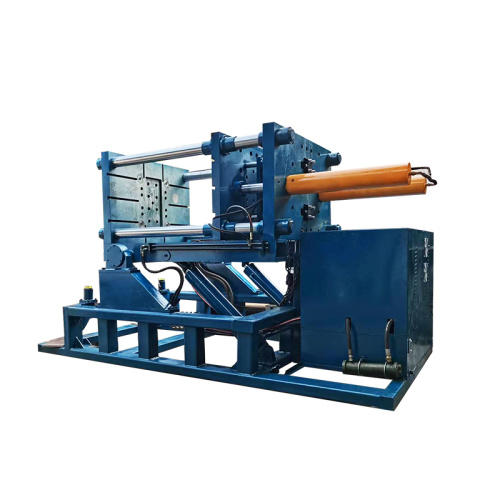
“It’s like magic”—but it’s really smart engineering. Our mobile low pressure machine is designed to deliver powerful performance in a simple, practical, and easy-to-use system. Built with
One foundry cut energy use by 38% by adopting a mobile low-pressure machine and applying smarter operating practices across the casting process. By maximizing equipment use, shortening holding time
Still using old-school casting methods? You’re not just slowing the process down—you’re losing valuable time every shift. Modern casting calls for more than memorized lines: strong performanc
Email to this supplier
Contact

Send Inquiry
PRODUCT CATEGORIES
Privacy statement: Your privacy is very important to Us. Our company promises not to disclose your personal information to any external company with out your explicit permission.
Fill in more information so that we can get in touch with you faster
Privacy statement: Your privacy is very important to Us. Our company promises not to disclose your personal information to any external company with out your explicit permission.